Coil & sensors
Check compatibility with the exact model and intended use. A similar connector is not confirmation.
Put it in the written request ↗ATLAS / SUPPORT
Prepare the information needed to discuss setup, documentation and a reported equipment issue.
Record the exact model, version, software and accessories actually being used.
Explain the expected behaviour, the observed behaviour and the conditions.
Follow documented checks for charge, connections and mode. Avoid changing several variables together.
Keep purchase records and check the written warranty terms and responsible contact.
THE QUESTION BEHIND THE EQUIPMENT
For a useful support enquiry, identify the exact model, version, software where relevant and the supplied kit. Explain what you expected to happen, what actually occurred and the conditions in which it happened. A short description linked to a specific manual page is more informative than a statement that a detector does not work. Photographs can help identify a configuration, but do not send sensitive location or personal information unnecessarily.
Do not open sealed assemblies, install unknown software or attempt a repair that conflicts with the manufacturer's instructions. Begin with the documented checks for charging, connections and the selected operating mode. Warranty and service arrangements depend on the written terms for the actual purchase; this website does not establish a local repair centre or promise coverage without those terms.
THE COMPLETE CONFIGURATION
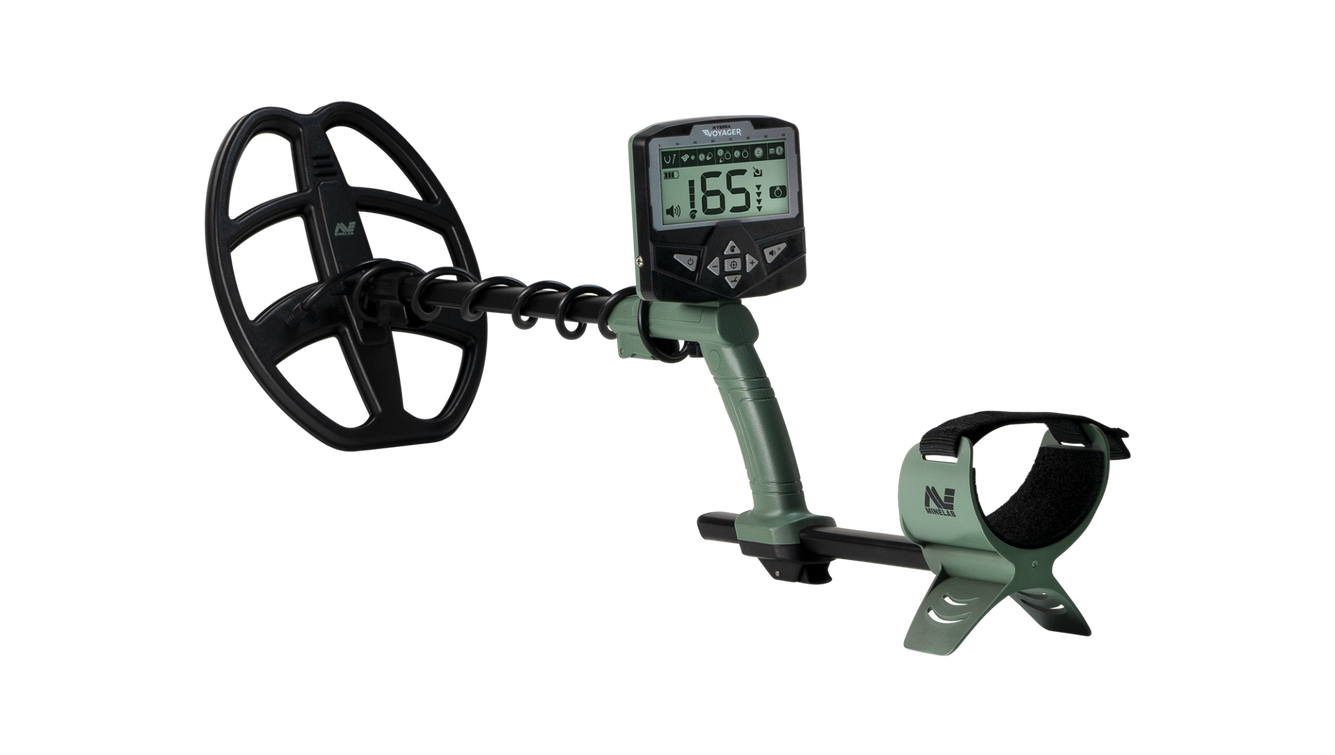
Illustrated model: X-TERRA VOYAGER. Confirm the actual supplied kit.
Check compatibility with the exact model and intended use. A similar connector is not confirmation.
Put it in the written request ↗Identify the version, language, any licence and the computer or tablet needed for the workflow.
Put it in the written request ↗Confirm the batteries, charger, cables, complete working weight and supplied carrying equipment.
Put it in the written request ↗KEEP THE DETAIL CLOSE
Open a note when you need the detail behind the decision.
Follow the cleaning, charging, storage and transport instructions for the exact model. Check the limits that apply to each component: a waterproof coil does not automatically make the control unit or every connector suitable for immersion. Use supported charging equipment and avoid opening sealed assemblies unless the applicable instructions or an authorised service arrangement explicitly permit it.
If something changes in operation, record the model, configuration, settings and circumstances before changing several variables at once. Begin with the documented checks and describe the observed behaviour precisely when asking for assistance. Preserve purchase and configuration records for warranty discussions. Do not install unknown firmware or software supplied through an unverified message. The appropriate service route and any costs must be confirmed under the written terms for the particular equipment.
Treat familiarisation as part of the equipment decision. Check the language and availability of the manual, the controls that must be understood and any training included in the proposed supply. Begin with the manufacturer's setup sequence and a suitable controlled environment. Record settings and observations so that you can distinguish an operating change from a change in the target or ground conditions.
For survey equipment, discuss collection procedure and interpretation separately. Knowing how to switch on a device is not the same as being able to design or interpret a survey. Ask who will review the work, what sample data is available and what limitations should be recorded. Avoid using an early demonstration as evidence that a larger task has been solved. A realistic learning plan makes the selected system more useful and gives support enquiries a clearer basis.
A model name is only the beginning of a configuration. Ask for a written list of the control unit, coil or sensors, shafts, charging equipment, batteries, headphones, cables, carrying equipment and any software that is actually included. Mark optional accessories separately. Product photographs may show a demonstration arrangement or several possible items; they are not a substitute for the supplied-kit list attached to a quotation.
Check compatibility whenever an accessory is changed. A connector that looks similar is not evidence that a coil, charger or sensor is supported. Consider the complete working weight, transport volume and charging arrangements, rather than the headline weight of one component. For software-dependent equipment, identify the required operating system and any computer or tablet that must be supplied separately. Keep version identifiers with the order so that later support questions refer to the equipment you actually received.
Use the original model page as a reference point and check the applicable manufacturer documentation for a technical question. Distinguish a confirmed specification from an editorial explanation, an illustrative image or a statement that needs clarification. Record the edition or version when it is available. If a claim lacks enough context to assess it, ask for the underlying conditions rather than repeating it as an established result.
Images of products identify a model, while field-work photographs communicate a setting. Neither establishes local stock, authorised dealership status or performance at a particular site. Demonstration graphics and three-dimensional displays also need a collection and interpretation method behind them. Keep written answers to important questions with the quotation. Where sources disagree, ask the responsible seller to resolve the difference explicitly, including which specification and configuration will apply to the proposed order.
A country or region is not a single ground condition. Surface cover, mineralisation, moisture, nearby interference and access can vary within the same work area. Describe what is actually known and label what is uncertain. Where the manufacturer describes ground balancing, noise handling or coil selection, read the procedure for the exact model. Do not transfer settings from a different device or assume that a setting removes every source of uncertainty.
A meaningful comparison records the target and test conditions as well as the observed response. Target size and orientation, coil arrangement, sweep technique and the surrounding ground may affect what is seen or heard. Distinguish an equipment operating limit, such as a water-resistance rating, from a detection result. A permitted immersion depth does not state how deeply an object will be detected. When site conditions remain unclear, request guidance and avoid turning a broad terrain description into a performance promise.
Review how the system records position and measurements, how data reaches the supported computer or tablet and how the software presents it. Identify the software version, licence conditions, hardware requirements and any additional equipment needed. Ask which parts of an example are demonstration material and which come from a documented collection process. A visual display is useful only when its origin and limitations can be understood.
A complete comparison includes the operator's procedure, repeatability of collection and the expertise needed to review an interpretation. Check whether data can be retained for later review and what documentation is supplied. Do not convert colours or shapes in a display into a certain material identification without appropriate evidence. The proposed kit should support the actual workflow, including transport, power and software access, rather than only the sensor shown in a photograph.
A website serving enquiries about Syria does not establish that every listed item is locally stocked or deliverable to every destination. Ask for the actual supply route, destination, available shipping arrangement and the party responsible for each part of the transaction. Confirm practical delivery details before paying. A general estimate should remain an estimate until the responsible seller confirms what can be offered for the specific order.
Request written clarification of packing, included documentation, warranty responsibility, possible service arrangements and the process if equipment arrives incomplete or damaged. If additional charges or restrictions may apply, resolve them with the appropriate parties before accepting the offer. This guide does not determine import eligibility or replace destination-specific advice. Its purpose is to make sure that a quotation addresses delivery openly rather than leaving important assumptions hidden behind a catalogue price.
Check that access and the proposed activity are authorised and that the work area is suitable for the task. A hobby detector or commercial prospecting device must not be used to declare land free from explosive hazards. If there is any concern about dangerous objects or unsafe ground, stop and use the appropriate specialist route. An equipment page cannot assess a location remotely or establish that it is safe to enter or disturb.
Plan around people, property, environmental conditions and the limits of the operator's competence. Avoid sharing precise sensitive locations in public messages. Record the purpose and boundaries of the activity and agree who makes a decision to stop if conditions change. These precautions belong to the planning of the work, independently of the device selected. Equipment comparison is useful only when the proposed activity itself is suitable and can be carried out responsibly.
THE NEXT USEFUL STEP